Blackboards
Blackboards, for behaviours to write and read from.
Blackboards are not a necessary component of behaviour tree implementations, but are nonetheless, a fairly common mechanism for sharing data between behaviours in the tree. See, for example, the design notes for blackboards in Unreal Engine.

Implementations vary widely depending on the needs of the framework using them. The simplest implementations take the form of a key-value store with global access, while more rigorous implementations scope access or form a secondary graph overlaying the tree connecting data ports between behaviours.
The ‘Zen of PyTrees’ is to enable rapid development, yet be rich enough so that all of the magic is exposed for debugging purposes. The first implementation of a blackboard was merely a global key-value store with an api that lent itself to ease of use, but did not expose the data sharing between behaviours which meant any tooling used to introspect or visualise the tree, only told half the story.
The current implementation adopts a strategy similar to that of a filesystem. Each client (subsequently behaviour) registers itself for read/write access to keys on the blackboard. This is less to do with permissions and more to do with tracking users of keys on the blackboard - extremely helpful with debugging.
The alternative approach of layering a secondary data graph with parameter and input-output ports on each behaviour was discarded as being too heavy for the zen requirements of py_trees. This is in part due to the wiring costs, but also due to complexity arising from a tree’s partial graph execution (a feature which makes trees different from most computational graph frameworks) and not to regress on py_trees’ capability to dynamically insert and prune subtrees on the fly.
A high-level list of existing / planned features:
[+] Centralised key-value store
[+] Client connections with namespaced read/write access to the store
[+] Integration with behaviours for key-behaviour associations (debugging)
[+] Activity stream that logs read/write operations by clients
[+] Exclusive locks for writing
[+] Framework for key remappings
The primary user-facing interface with the blackboard is via the Client.
- class py_trees.blackboard.Client(*, name: str | None = None, namespace: str | None = None)
Client to the key-value store for sharing data between behaviours.
Examples
Blackboard clients will accept a user-friendly name or create one for you if none is provided. Regardless of what name is chosen, clients are always uniquely identified via a uuid generated on construction.
provided = py_trees.blackboard.Client(name="Provided")
print(provided)
generated = py_trees.blackboard.Client()
print(generated)
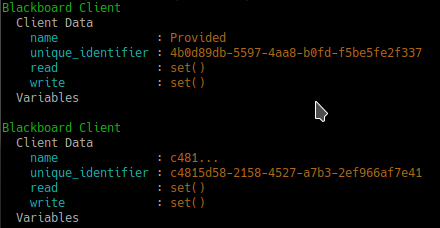
Client Instantiation
Register read/write access for keys on the blackboard. Note, registration is not initialisation.
blackboard = py_trees.blackboard.Client(name="Client")
blackboard.register_key(key="foo", access=py_trees.common.Access.WRITE)
blackboard.register_key(key="bar", access=py_trees.common.Access.READ)
blackboard.foo = "foo"
print(blackboard)
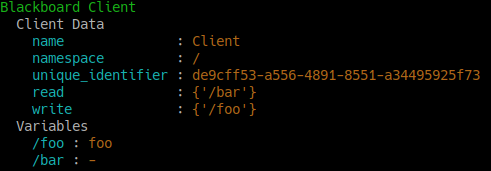
Variable Read/Write Registration
Keys and clients can make use of namespaces, designed by the ‘/’ char. Most methods permit a flexible expression of either relative or absolute names.
blackboard = py_trees.blackboard.Client(name="Global")
parameters = py_trees.blackboard.Client(name="Parameters", namespace="parameters")

blackboard.register_key(key="foo", access=py_trees.common.Access.WRITE)
blackboard.register_key(key="/bar", access=py_trees.common.Access.WRITE)
blackboard.register_key(key="/parameters/default_speed", access=py_trees.common.Access.WRITE)
parameters.register_key(key="aggressive_speed", access=py_trees.common.Access.WRITE)

blackboard.foo = "foo"
blackboard.bar = "bar"
blackboard.parameters.default_speed = 20.0
parameters.aggressive_speed = 60.0

miss_daisy = blackboard.parameters.default_speed
van_diesel = parameters.aggressive_speed

print(blackboard)
print(parameters)

Namespaces and Namespaced Clients
Disconnected instances will discover the centralised key-value store.
def check_foo():
    blackboard = py_trees.blackboard.Client(name="Reader")
    blackboard.register_key(key="foo", access=py_trees.common.Access.READ)
    print("Foo: {}".format(blackboard.foo))


blackboard = py_trees.blackboard.Client(name="Writer")
blackboard.register_key(key="foo", access=py_trees.common.Access.WRITE)
blackboard.foo = "bar"
check_foo()
To respect an already initialised key on the blackboard:
blackboard = Client(name="Writer")
blackboard.register_key(key="foo", access=py_trees.common.Access.READ)
result = blackboard.set("foo", "bar", overwrite=False)
Store complex objects on the blackboard:
class Nested(object):
    def __init__(self):
        self.foo = None
        self.bar = None

    def __str__(self):
        return str(self.__dict__)


writer = py_trees.blackboard.Client(name="Writer")
writer.register_key(key="nested", access=py_trees.common.Access.WRITE)
reader = py_trees.blackboard.Client(name="Reader")
reader.register_key(key="nested", access=py_trees.common.Access.READ)

writer.nested = Nested()
writer.nested.foo = "I am foo"
writer.nested.bar = "I am bar"

foo = reader.nested.foo
print(writer)
print(reader)
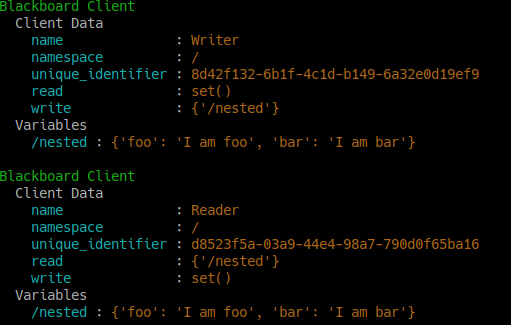
Log and display the activity stream:
py_trees.blackboard.Blackboard.enable_activity_stream(maximum_size=100)
reader = py_trees.blackboard.Client(name="Reader")
reader.register_key(key="foo", access=py_trees.common.Access.READ)
writer = py_trees.blackboard.Client(name="Writer")
writer.register_key(key="foo", access=py_trees.common.Access.WRITE)
writer.foo = "bar"
writer.foo = "foobar"
unused_result = reader.foo
print(py_trees.display.unicode_blackboard_activity_stream())
py_trees.blackboard.Blackboard.activity_stream.clear()

Display the blackboard on the console, or part thereof:
writer = py_trees.blackboard.Client(name="Writer")
for key in {"foo", "bar", "dude", "dudette"}:
    writer.register_key(key=key, access=py_trees.common.Access.WRITE)

reader = py_trees.blackboard.Client(name="Reader")
for key in {"foo", "bar"}:
    reader.register_key(key="key", access=py_trees.common.Access.READ)

writer.foo = "foo"
writer.bar = "bar"
writer.dude = "bob"

# all key-value pairs
print(py_trees.display.unicode_blackboard())
# various filtered views
print(py_trees.display.unicode_blackboard(key_filter={"foo"}))
print(py_trees.display.unicode_blackboard(regex_filter="dud*"))
print(py_trees.display.unicode_blackboard(client_filter={reader.unique_identifier}))
# list the clients associated with each key
print(py_trees.display.unicode_blackboard(display_only_key_metadata=True))
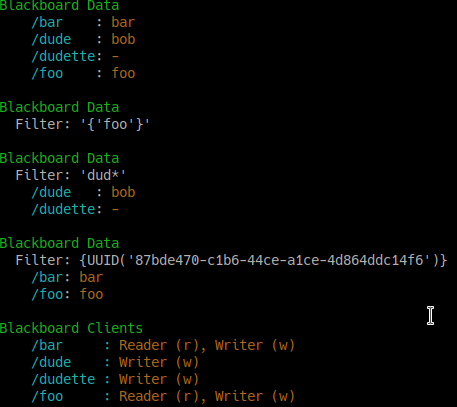
Behaviours are not automagically connected to the blackboard but you may manually attach one or more clients so that associations between behaviours and variables can be tracked - this is very useful for introspection and debugging.
Creating a custom behaviour with blackboard variables:
class Foo(py_trees.behaviour.Behaviour):

    def __init__(self, name):
        super().__init__(name=name)
        self.blackboard = self.attach_blackboard_client(name="Foo Global")
        self.parameters = self.attach_blackboard_client(name="Foo Params", namespace="foo_parameters_")
        self.state = self.attach_blackboard_client(name="Foo State", namespace="foo_state_")

        # create a key 'foo_parameters_init' on the blackboard
        self.parameters.register_key("init", access=py_trees.common.Access.READ)
        # create a key 'foo_state_number_of_noodles' on the blackboard
        self.state.register_key("number_of_noodles", access=py_trees.common.Access.WRITE)

    def initialise(self):
        self.state.number_of_noodles = self.parameters.init

    def update(self):
        self.state.number_of_noodles += 1
        self.feedback_message = self.state.number_of_noodles
        if self.state.number_of_noodles > 5:
            return py_trees.common.Status.SUCCESS
        else:
            return py_trees.common.Status.RUNNING


# could equivalently do directly via the Blackboard static methods if
# not interested in tracking / visualising the application configuration
configuration = py_trees.blackboard.Client(name="App Config")
configuration.register_key("foo_parameters_init", access=py_trees.common.Access.WRITE)
configuration.foo_parameters_init = 3

foo = Foo(name="The Foo")
for i in range(1, 8):
    foo.tick_once()
    print("Number of Noodles: {}".format(foo.feedback_message))
Rendering a dot graph for a behaviour tree, complete with blackboard variables:
# in code
py_trees.display.render_dot_tree(py_trees.demos.blackboard.create_root())
# command line tools
py-trees-render --with-blackboard-variables py_trees.demos.blackboard.create_root
And to demonstrate that it doesn’t become a tangled nightmare at scale, an example of a more complex tree:
Debug deeper with judicious application of the tree, blackboard and activity stream display methods around the tree tick (refer to
py_trees.visitors.DisplaySnapshotVisitorfor examplar code):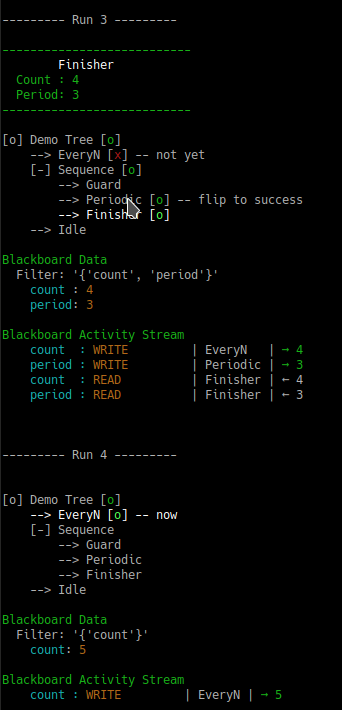
Tree level debugging
See also
- Attributes:
name (str): client’s convenient, but not necessarily unique identifier namespace (str): apply this as a prefix to any key/variable name operations unique_identifier (uuid.UUID): client’s unique identifier read (typing.Set[str]): set of absolute key names with read access write (typing.Set[str]): set of absolute key names with write access exclusive (typing.Set[str]): set of absolute key names with exclusive write access required (typing.Set[str]): set of absolute key names required to have data present remappings (typing.Dict[str, str]: client key names with blackboard remappings namespaces (typing.Set[str]: a cached list of namespaces this client accesses